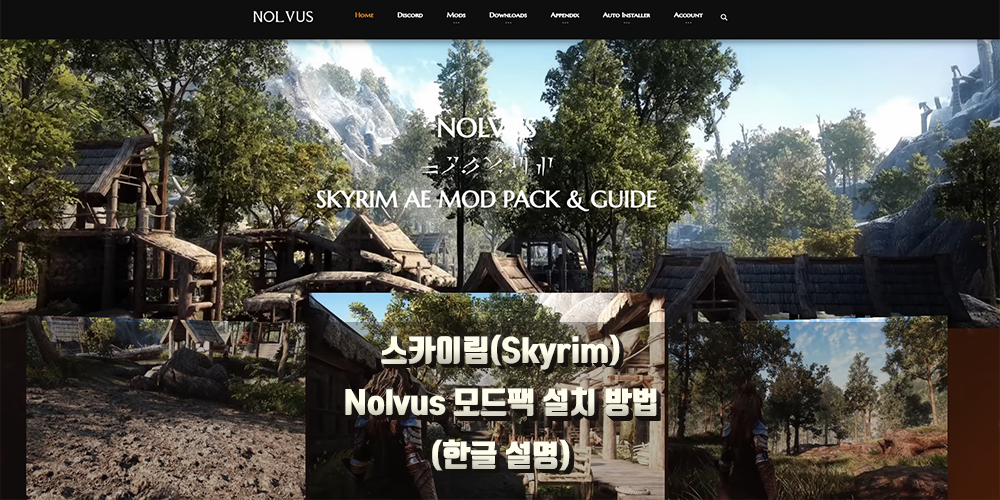
모드팩 설명
NOLVUS | SKYRIM AE Modding Guide
Nolvus Awakening is a photrealistic preset using Anniversary Edition, Seasons, Northern roads, latest complex parallax features, a revamped Legacy of the Dragonborn content with more displays and next MCO generation combats This version is based on Natural
www.nolvus.net
↑ 설명을 위해서 참고하면 좋은 영상
간단히 말하자면, 외국산 대용량의 모드팩
국내 모드팩으로 유명한건 (툴리우스 채널 - https://arca.live/b/tullius?category=%EB%AA%A8%EB%93%9C) 도 있으니 골라서 선택하면 좋을 것 같습니다.
본론으로 돌아와 놀부스는 와드잭 프로그램을 활용하여 설치하는 해외 모드팩들과 달리, 자체 프로그램을 사용하여 모드팩을 설치하는 방식입니다.
또한 해당 모드팩을 사용하는 유저들이 많기 때문에 버그나 CTD에 대해 피드백이 빠르게 이뤄지고 있는 편이며, 퀄리티 또한 해외 모드 중에서 사용량 1위 답게 좋습니다. 엘더스크롤 스카이림 후속작이 있다 해도 이 것보다 좋을 순 없을 겁니다.
그래픽 대비 최적화는 잘 되어 있는 편이긴 하지만, 그럼에도 높은 사양을 요구하는 것이 사실입니다.
놀부스의 가장 특징은 전투나 캐릭터 요소도 있겠지만, 환경적 요소가 기존과 크게 다릅니다.
모드 Index가 5기준 1300개가 훨씬 넘어 갔으며, 개인 구축이 귀찮지만 스카이림을 즐기고 싶어하는 유저분들이 하시기에 제일 적합한 모드팩이라 생각합니다.
현재 베타로 나온 6기준으로는 약 3600개 정도 구성 되어 있습니다.
하드웨어 요구 사양
QHD (2560x1440) 모니터 기준 (Nolvus Ascension 5 기준)
| Minimum | Recommended | |
| CPU | Intel Core i7 7000 Series | Intel Core i7 7000 Series |
| GPU | NVIDIA GTX 1080 ti | NVIDIA GTX 1080 ti |
| RAM | 16 GB | 32 GB |
| VRAM | 10 GB | 10 GB |
| Intallation Size | 372 GB | |
| Download Size | 170 GB |
리덕스 (오픈시티 적용X)
| Minimum | Recommended | |
| CPU | Intel Core i7 10000 Series | Intel Core i7 10000 Series |
| GPU | NVIDIA RTX 4070 | NVIDIA RTX 4070 Ti |
| RAM | 16 GB | 32 GB |
| VRAM | 12 GB | 12 GB |
| Intallation Size | 372 GB | |
| Download Size | 170 GB |
리덕스 (오픈시티 적용O)
| Minimum | Recommended | |
| CPU | Intel Core i7 10000 Series | Intel Core i7 10000 Series |
| GPU | NVIDIA RTX 3080 ti | NVIDIA RTX 4070 |
| RAM | 16 GB | 32 GB |
| VRAM | 12 GB | 12 GB |
| Intallation Size | 406 GB | |
| Download Size | 188 GB |
울트라 (오픈시티 적용X)
| Minimum | Recommended | |
| CPU | Intel Core i7 10000 Series | Intel Core i7 10000 Series |
| GPU | NVIDIA RTX 4070 Ti Super | NVIDIA RTX 4080 |
| RAM | 16 GB | 32 GB |
| VRAM | 15 GB | 15 GB |
| Intallation Size | 406 GB | |
| Download Size | 188 GB |
울트라 (오픈시티 적용O)
Nolvus Awakening 6 기준
SR Exterior Cities 없음 (Ultimate)
최소 요구 사항
| CPU | VRAM | GPU | Resolution | Size |
| Intel Core i7 10000 Series | 14 | NVIDIA RTX 4060 Ti | 1920x1080 | 426GB |
| Intel Core i7 10000 Series | 15 | NVIDIA RTX 4070 Ti Super | 2560x1440 | 426GB |
| Intel Core i7 10000 Series | 16 | NVIDIA RTX 4090 | 3840x2160 | 426GB |
추천 요구 사항
| CPU | VRAM | GPU | Resolution | Size |
| Intel Core i7 10000 Series | 14 | NVIDIA RTX 4070 Ti Super | 1920x1080 | 426GB |
| Intel Core i7 10000 Series | 15 | NVIDIA RTX 4070 Ti Super | 2560x1440 | 426GB |
| Intel Core i7 10000 Series | 16 | NVIDIA RTX 4090 | 3840x2160 | 426GB |
SR Exterior Cities 있음 (Ultimate)
최소 요구 사항
| CPU | VRAM | GPU | Resolution | Size |
| Intel Core i7 10000 Series | 16 | NVIDIA RTX 4080 | 1920x1080 | 426GB |
| Intel Core i7 10000 Series | 17 | NVIDIA RTX 3090 | 2560x1440 | 426GB |
| Intel Core i7 10000 Series | 18 | NVIDIA RTX 4090 | 3840x2160 | 426GB |
추천 요구 사항
| CPU | VRAM | GPU | Resolution | Size |
| Intel Core i7 10000 Series | 16 | NVIDIA RTX 4080 Super | 1920x1080 | 426GB |
| Intel Core i7 10000 Series | 17 | NVIDIA RTX 4090 | 2560x1440 | 426GB |
| Intel Core i7 10000 Series | 18 | NVIDIA RTX 4090 | 3840x2160 | 426GB |
SR Exterior Cities 없음 (Ultra)
최소 요구 사항
| CPU | VRAM | GPU | Resolution | LODs | Size |
| Intel Core i7 10000 Series | 10 | NVIDIA RTX 3080 | 1920x1080 | Performance | 406GB |
| Intel Core i7 10000 Series | 11 | NVIDIA RTX 3060 | 2560x1440 | Performance | 406GB |
| Intel Core i7 10000 Series | 12 | NVIDIA RTX 4070 Ti | 3840x2160 | Performance | 406GB |
| Intel Core i7 10000 Series | 11 | NVIDIA RTX 3080 Ti | 1920x1080 | Ultra | 406GB |
| Intel Core i7 10000 Series | 12 | NVIDIA RTX 3080 Ti | 2560x1440 | Ultra | 406GB |
| Intel Core i7 10000 Series | 13 | NVIDIA RTX 4070 Ti Super | 3840x2160 | Ultra | 406GB |
| Intel Core i7 10000 Series | 10 | NVIDIA RTX 2080 Ti | 1920x1080 | Ultra Performance | 406GB |
| Intel Core i7 10000 Series | 11 | NVIDIA RTX 2080 Ti | 2560x1440 | Ultra Performance | 406GB |
| Intel Core i7 10000 Series | 12 | NVIDIA RTX 4060 Ti | 3840x2160 | Ultra Performance | 406GB |
추천 요구 사항
| CPU | VRAM | GPU | Resolution | LODs | Size |
| Intel Core i7 10000 Series | 10 | NVIDIA RTX 3080 Ti | 1920x1080 | Performance | 406GB |
| Intel Core i7 10000 Series | 11 | NVIDIA RTX 3080 Ti | 2560x1440 | Performance | 406GB |
| Intel Core i7 10000 Series | 12 | NVIDIA RTX 4080 | 3840x2160 | Performance | 406GB |
| Intel Core i7 10000 Series | 11 | NVIDIA RTX 4070 | 1920x1080 | Ultra | 406GB |
| Intel Core i7 10000 Series | 12 | NVIDIA RTX 4070 | 2560x1440 | Ultra | 406GB |
| Intel Core i7 10000 Series | 13 | NVIDIA RTX 4080 Super | 3840x2160 | Ultra | 406GB |
| Intel Core i7 10000 Series | 10 | NVIDIA RTX 3080 | 1920x1080 | Ultra Performance | 406GB |
| Intel Core i7 10000 Series | 11 | NVIDIA RTX 3060 | 2560x1440 | Ultra Performance | 406GB |
| Intel Core i7 10000 Series | 12 | NVIDIA RTX 4070 Ti Super | 3840x2160 | Ultra Performance | 406GB |
SR Exterior Cities 있음 (Ultra)
최소 요구 사항
| CPU | VRAM | GPU | Resolution | LODs | Size |
| Intel Core i7 10000 Series | 13 | NVIDIA RTX 4060 Ti | 1920x1080 | Performance | 406GB |
| Intel Core i7 10000 Series | 14 | NVIDIA RTX 4060 Ti | 2560x1440 | Performance | 406GB |
| Intel Core i7 10000 Series | 15 | NVIDIA RTX 4070 Ti Super | 3840x2160 | Performance | 406GB |
| Intel Core i7 10000 Series | 14 | NVIDIA RTX 4060 Ti | 1920x1080 | Ultra | 406GB |
| Intel Core i7 10000 Series | 15 | NVIDIA RTX 4070 Ti Super | 2560x1440 | Ultra | 406GB |
| Intel Core i7 10000 Series | 16 | NVIDIA RTX 4080 | 3840x2160 | Ultra | 406GB |
| Intel Core i7 10000 Series | 13 | NVIDIA RTX 4060 Ti | 1920x1080 | Ultra Performance | 406GB |
| Intel Core i7 10000 Series | 14 | NVIDIA RTX 4060 Ti | 2560x1440 | Ultra Performance | 406GB |
| Intel Core i7 10000 Series | 15 | NVIDIA RTX 4070 Ti Super | 3840x2160 | Ultra Performance | 406GB |
추천 요구 사항
| CPU | VRAM | GPU | Resolution | LODs | Size |
| Intel Core i7 10000 Series | 15 | NVIDIA RTX 4080 | 2560x1440 | Ultra | 406GB |
| Intel Core i7 10000 Series | 14 | NVIDIA RTX 4070 Ti Super | 1920x1080 | Ultra | 406GB |
| Intel Core i7 10000 Series | 13 | NVIDIA RTX 4070 Ti Super | 1920x1080 | Performance | 406GB |
| Intel Core i7 10000 Series | 13 | NVIDIA RTX 4070 Ti Super | 1920x1080 | Ultra Performance | 406GB |
| Intel Core i7 10000 Series | 14 | NVIDIA RTX 4070 Ti Super | 2560x1440 | Performance | 406GB |
| Intel Core i7 10000 Series | 14 | NVIDIA RTX 4070 Ti Super | 2560x1440 | Ultra Performance | 406GB |
| Intel Core i7 10000 Series | 16 | NVIDIA RTX 4080 Super | 3840x2160 | Ultra | 406GB |
| Intel Core i7 10000 Series | 15 | NVIDIA RTX 4080 | 3840x2160 | Performance | 406GB |
| Intel Core i7 10000 Series | 15 | NVIDIA RTX 4080 | 3840x2160 | Ultra Performance | 406GB |
SR Exterior Cities 없이 (Redux)
최소 요구 사항
| CPU | VRAM | GPU | Resolution | Size |
| Intel Core i7 7000 Series | 8 | NVIDIA GTX 1080 | 1920x1080 | 372GB |
| Intel Core i7 7000 Series | 10 | NVIDIA GTX 1080 Ti | 2560x1440 | 372GB |
| Intel Core i7 7000 Series | 11 | NVIDIA RTX 2080 Ti | 3840x2160 | 372GB |
추천 요구 사항
| CPU | VRAM | GPU | Resolution | Size |
| Intel Core i7 7000 Series | 8 | NVIDIA RTX 2070 | 1920x1080 | 372GB |
| Intel Core i7 7000 Series | 10 | NVIDIA GTX 1080 Ti | 2560x1440 | 372GB |
| Intel Core i7 7000 Series | 11 | NVIDIA RTX 2080 Ti | 3840x2160 | 372GB |
SR Exterior Cities 있음 (Redux)
최소 요구 사항
| CPU | VRAM | GPU | Resolution | Size |
| Intel Core i7 10000 Series | 10 | NVIDIA GTX 1080 Ti | 1920x1080 | 372GB |
| Intel Core i7 10000 Series | 12 | NVIDIA RTX 4070 | 2560x1440 | 372GB |
| Intel Core i7 10000 Series | 13 | NVIDIA RTX 4060 Ti | 3840x2160 | 372GB |
추천 요구 사항
| CPU | VRAM | GPU | Resolution | Size |
| Intel Core i7 10000 Series | 10 | NVIDIA RTX 3080 | 1920x1080 | 372GB |
| Intel Core i7 10000 Series | 12 | NVIDIA RTX 4070 Ti | 2560x1440 | 372GB |
| Intel Core i7 10000 Series | 13 | NVIDIA RTX 4070 Ti Super | 3840x2160 | 372GB |
설치 준비 (기타 준비)
https://www.nexusmods.com/ (회원 가입 필요)
Nexus Mods
We host 702,229 mods for 3,692 games from 157,471 authors serving 62,304,415 members with 16,283,891,271 downloads to date. We've donated $12,259,421 to our mod authors through Donation Points. If you can mod it, we'll host it.
www.nexusmods.com
https://www.nolvus.net/account/register (회원 가입 필요)
NOLVUS | SKYRIM SE Modding Guide | Register
Nolvus Ascension (v5) 1. Core setup 1.1 Game Installation & Setup 1.2 Mod Pack Directories 1.3 Stock Game Creation 1.4 Softwares & Tools 1.5 Core mods 1.5.1 SKSE Plugins 1.5.2 Bug Fixes & Tweaks 1.5.3 Alternate Start 2 User Interface 2.1 Huds 2.2 HOTKEYS 2
www.nolvus.net
두 곳의 계정이 필요합니다. 기존 스카이림을 즐기던 유저 분이라면, 넥서스 계정은 있을 것이니 놀부스 계정만 생성하시면 됩니다.
만약, 없으시다면 생성 하셔야 합니다.
또한 모드 설치는 넥서스 프리미엄이 아니라도 설치를 받을 수 있으나, 넥서스 정책 때문에 플레이어가 일일이 하나씩 클릭하여 설치해야 하는 번거로움이 있습니다.
가급적 편리한 설치를 위해 프리미엄 1달만 가입 하시는 것을 권장드립니다.
기타 선택 사항
https://dotnet.microsoft.com/en-us/download/dotnet/5.0
Download .NET 5.0 (Linux, macOS, and Windows) | .NET
.NET 5.0 downloads for Linux, macOS, and Windows. .NET is a free, cross-platform, open-source developer platform for building many different types of applications.
dotnet.microsoft.com
최산 Windows x64 SDK 버전 설치
https://learn.microsoft.com/en-us/cpp/windows/latest-supported-vc-redist?view=msvc-170
Latest supported Visual C++ Redistributable downloads
This article lists the download links for the latest versions of Visual C++ Redistributable packages.
learn.microsoft.com
Visual Studio 2015,2017,2019,2022 설치
설치 준비 (게임 본편)
Window 10/11 64비트 운영체제가 필요. 설치 프로그램은 64비트 시스템을 기반으로 작동.
반드시 Steam 에서 제공되는 Anniversary Upgrade를 통해 Skyrim Anniversary Edition 혹은 Skyrim Special Edition이 필요합니다.
https://store.steampowered.com/app/1746860/The_Elder_Scrolls_V_Skyrim_Anniversary_Upgrade/
The Elder Scrolls V: Skyrim Anniversary Upgrade on Steam
The Anniversary Upgrade includes pre-existing and new Creation Club content like quests, dungeons, bosses, weapons, spells, and more. With Creations, there is a lot more to discover. You must own Skyrim Special Edition to access this content.
store.steampowered.com
해당 버전을 설치 한 후, 반드시 게임을 1회 이상 실행하여 모든 크리에이션 클럽 모드를 다운 받아야 합니다.
이후 Skyrim Special Edition 파일 내에 Creation 모드가 설치 되어 있는지 확인 합니다.
위와 같이 적용되어 있을 경우 다음 단계로 넘어가도 무관합니다.
해당 과정은 모드 설치 이전 이후 어느때나 적용해도 상관은 없습니다. 다만, 해당 과정을 생략하면 게임 실행이 불가능하다는 점 염두 바랍니다.
설치 준비 (컴퓨터 설정)
이 과정은 게임 설치가 완료 된 이후 설정해 주시길 바랍니다.
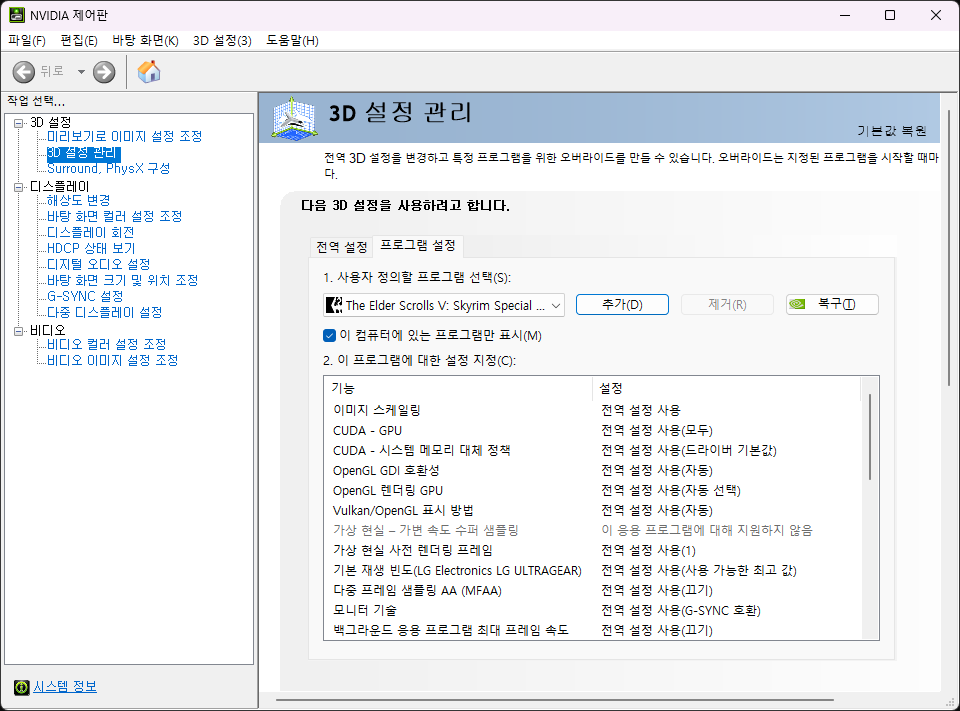
Nividia 제어판 → 3D 설정 관리 → 프로그램 설정 → 스카이림 설정
전원 관리 모드 : 최대 성능 선호
설치 과정 (모드 설정)
Nolvus Updater 다운로드
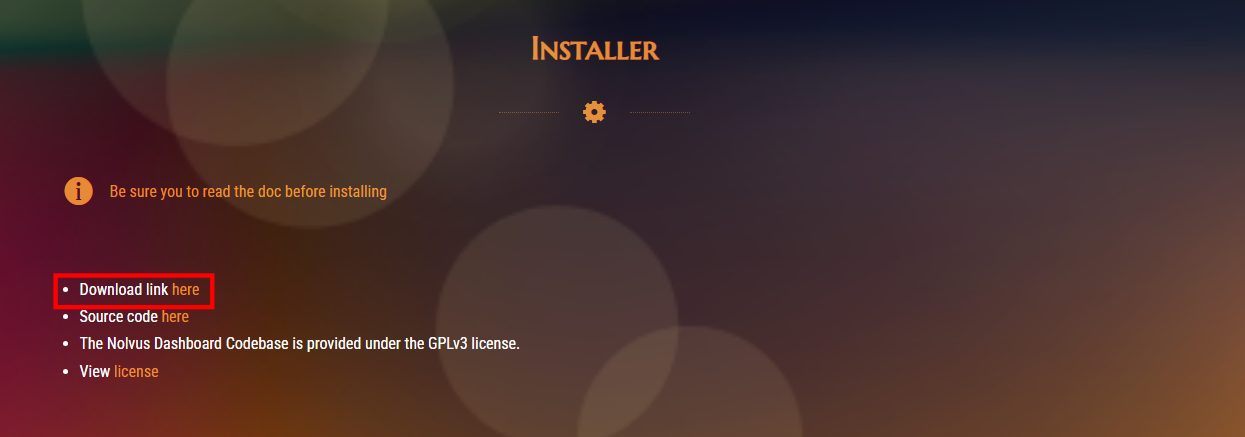
https://www.nolvus.net/downloads/installer
NOLVUS | SKYRIM SE Modding Guide | Download Auto Installer
Nolvus Ascension (v5) 1. Core setup 1.1 Game Installation & Setup 1.2 Mod Pack Directories 1.3 Stock Game Creation 1.4 Softwares & Tools 1.5 Core mods 1.5.1 SKSE Plugins 1.5.2 Bug Fixes & Tweaks 1.5.3 Alternate Start 2 User Interface 2.1 Huds 2.2 HOTKEYS 2
www.nolvus.net
위 링크 들어가서 해당 링크를 클릭하여 실행
Nolvus Updater 실행
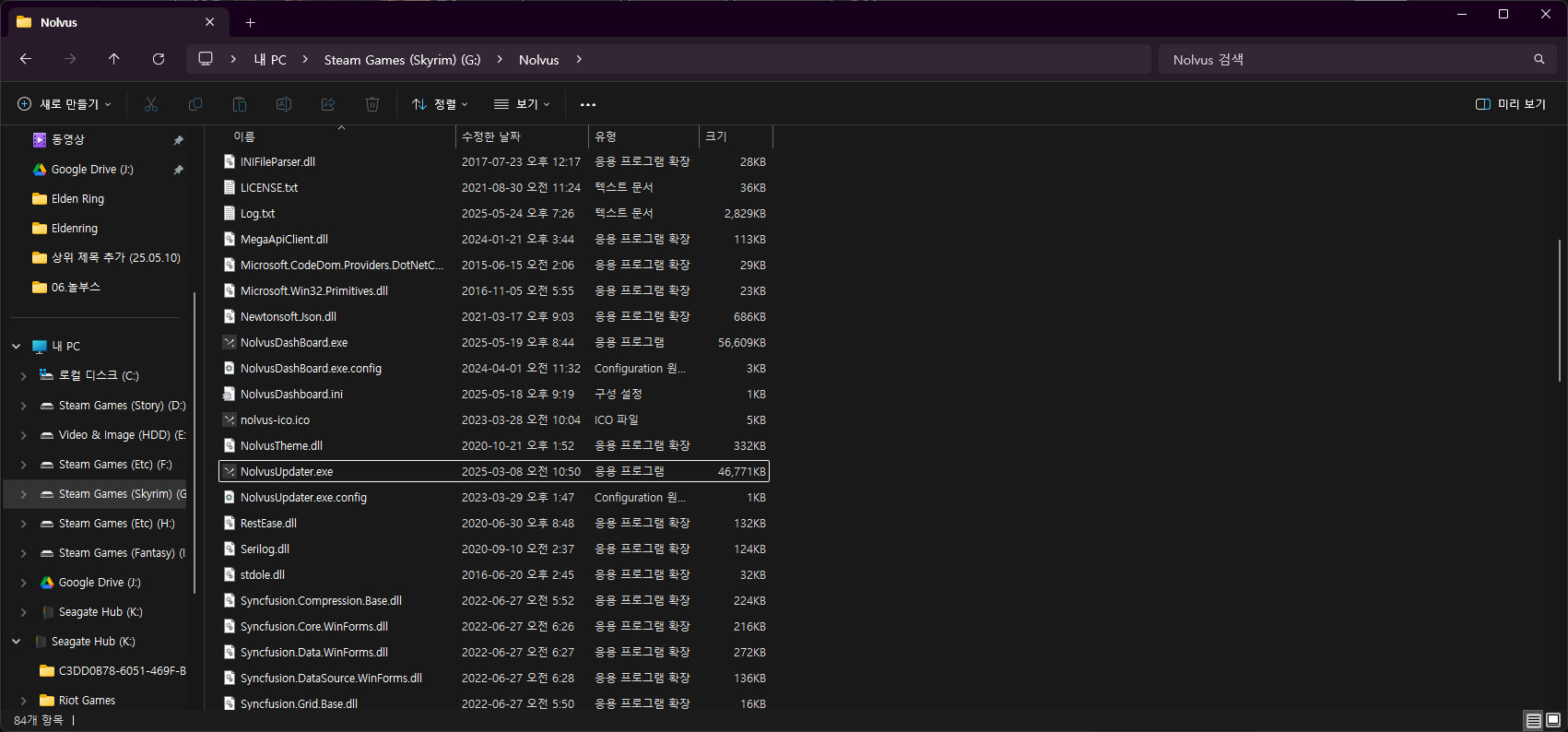
다운 받은 파일을 실행 시, NolvusDashBoard 생성
스카이림 설치 경로 선택
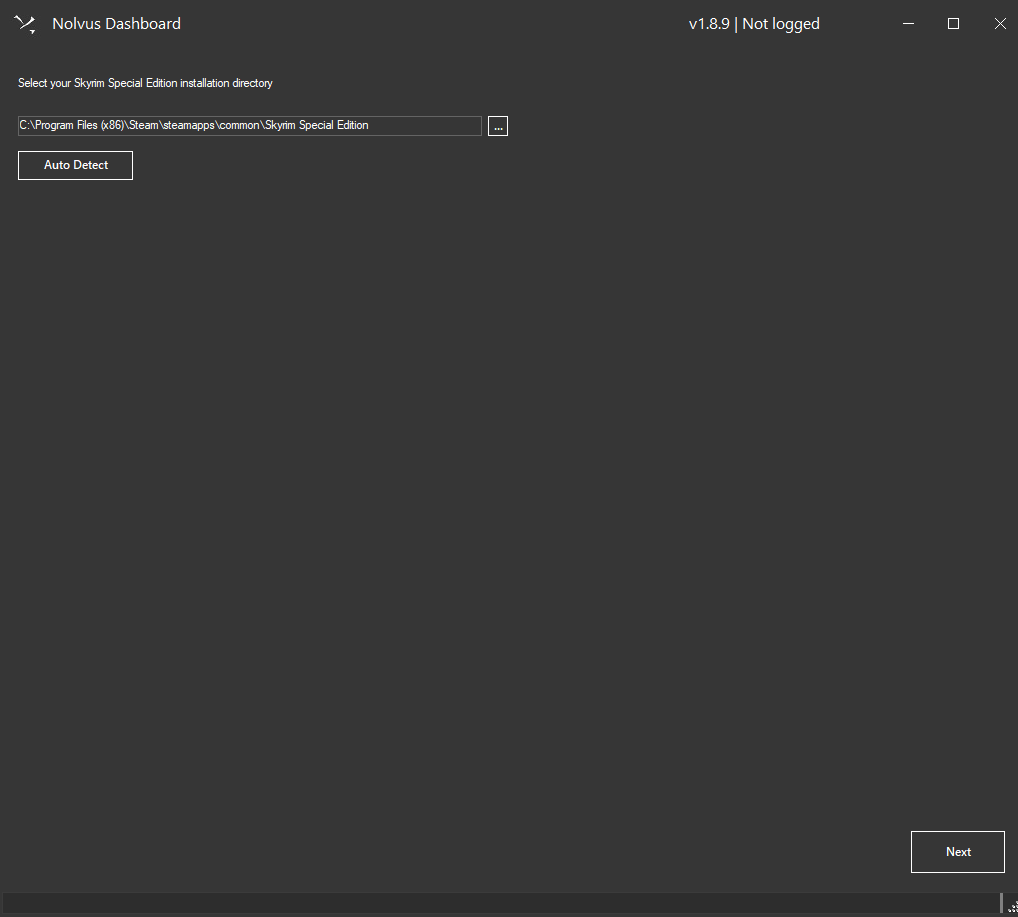
넥서스(Nexus) 계정 로그인
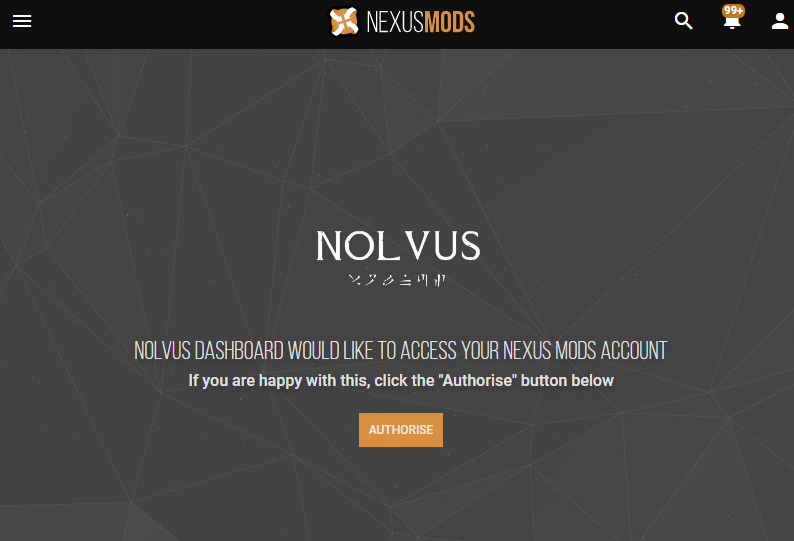
위는 넥서스 본인 프로필 수정 → API Key 에서 확인 할 수 있습니다.
놀부스 계정 로그인
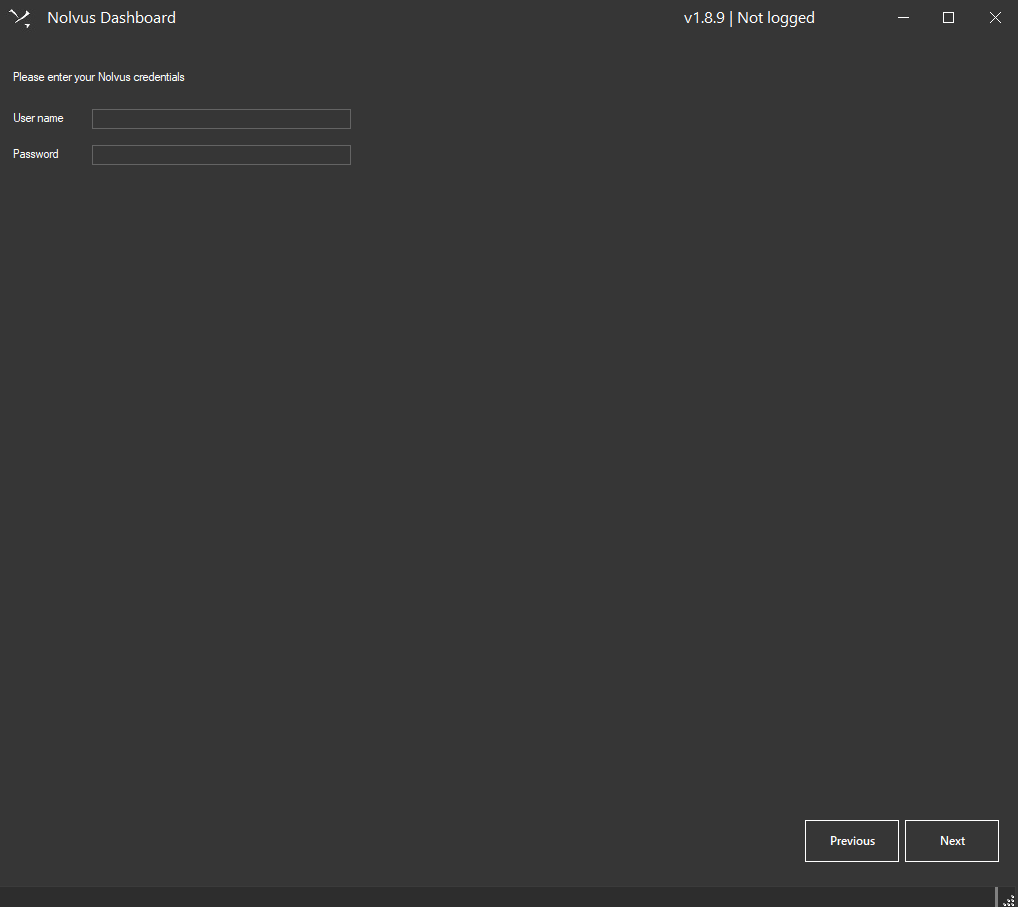
NolvusDashBoard 실행
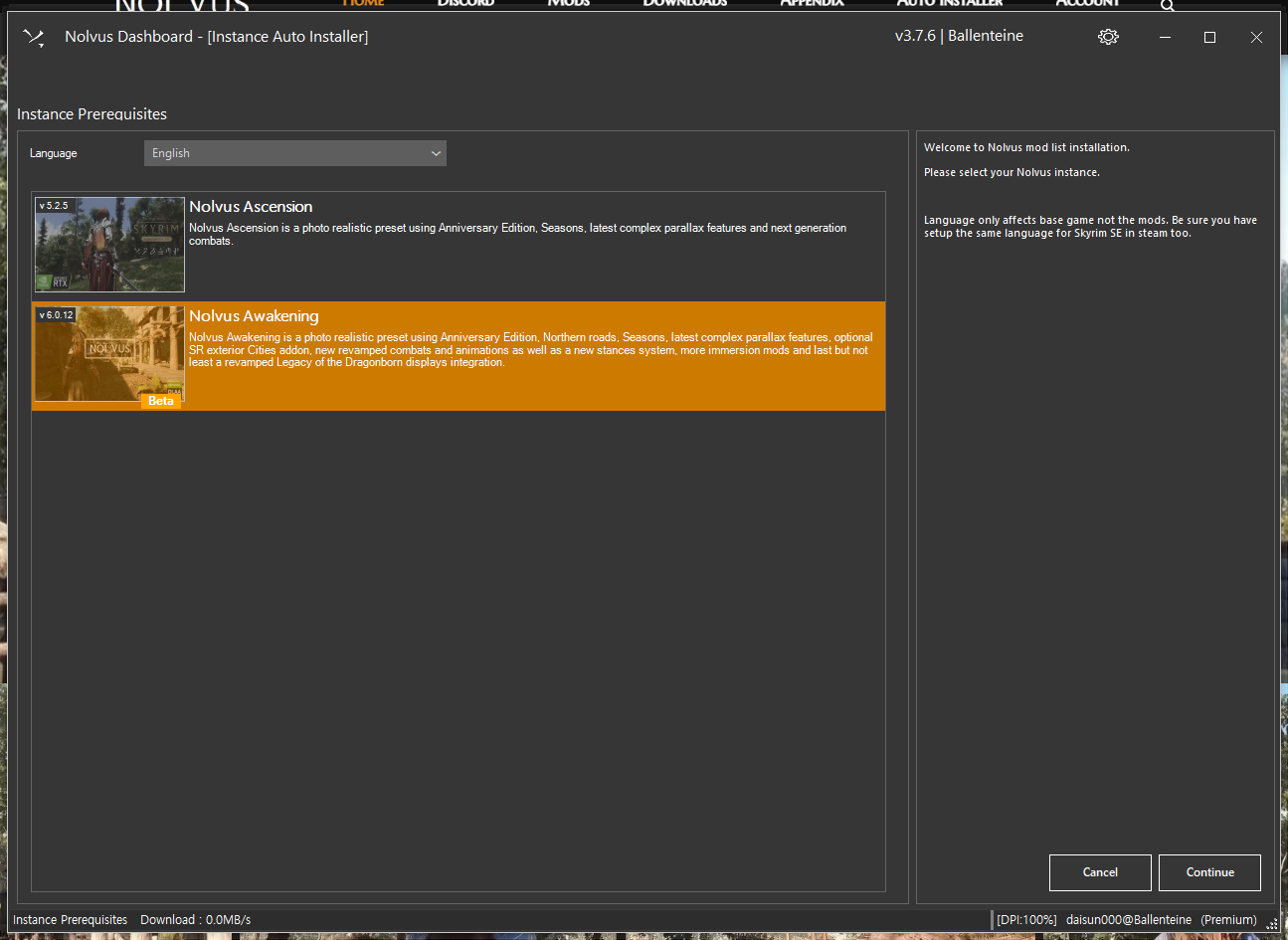
설치를 원하는 모드팩을 설치
Nolvus Ascension v5.2.5 기존 버전
출시 된지 오래 되었고, 때문에 안전성이 높음.
Nolvus Awakening v6.0.12 신규 버전
출시 된지 얼마 안되었음. 때문에 안전성이 위 버전보다 낮은 편.
또한 사양 또한 기존 것 보다 더 많이 요구 됨.
설치 경로 설정
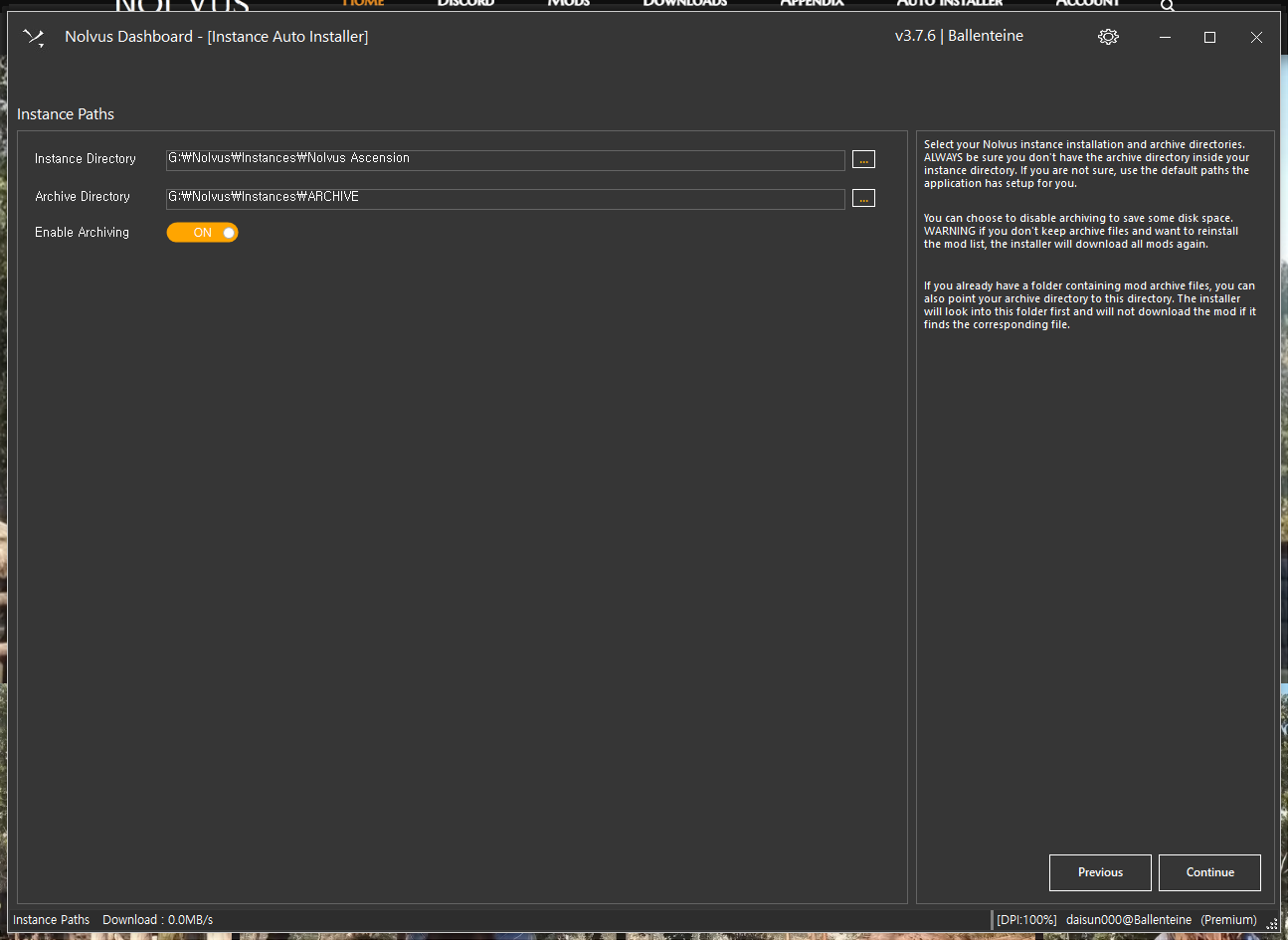
설치하고자 하는 위치에 폴더 지정
주의 사항
용량이 충분한지 확인
HDD에 설치 하지 말 것
옵션 설정 1
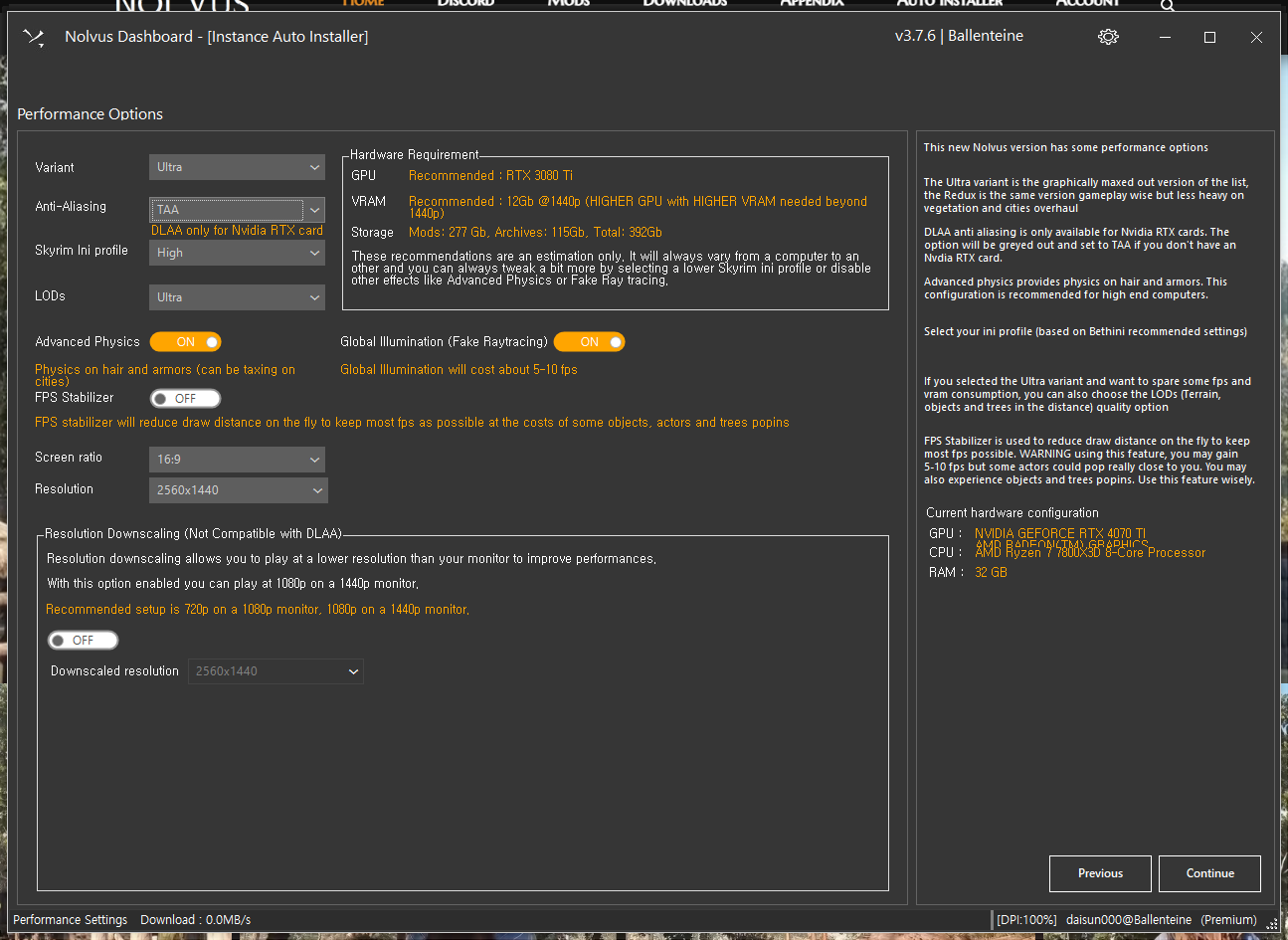
옵션에 따라 타협하여 체크
나머지 옵션은 기본 선택된 옵션대로 설치 하시는 것을 추천 드립니다.
SR Exterior cities 혹은 open city 는 둘다 마을과 필드 사이에 로딩을 없애주는 모드입니다.
따라서 사양을 엄청나게 많이 잡아먹습니다. 옵션이 충분한 것이 아니라면, 설치 안하는 것을 추천 드립니다.
사양 비교는 위에 사양 비교 탭을 참고해 주시면 감사하겠습니다.
옵션 설정 2
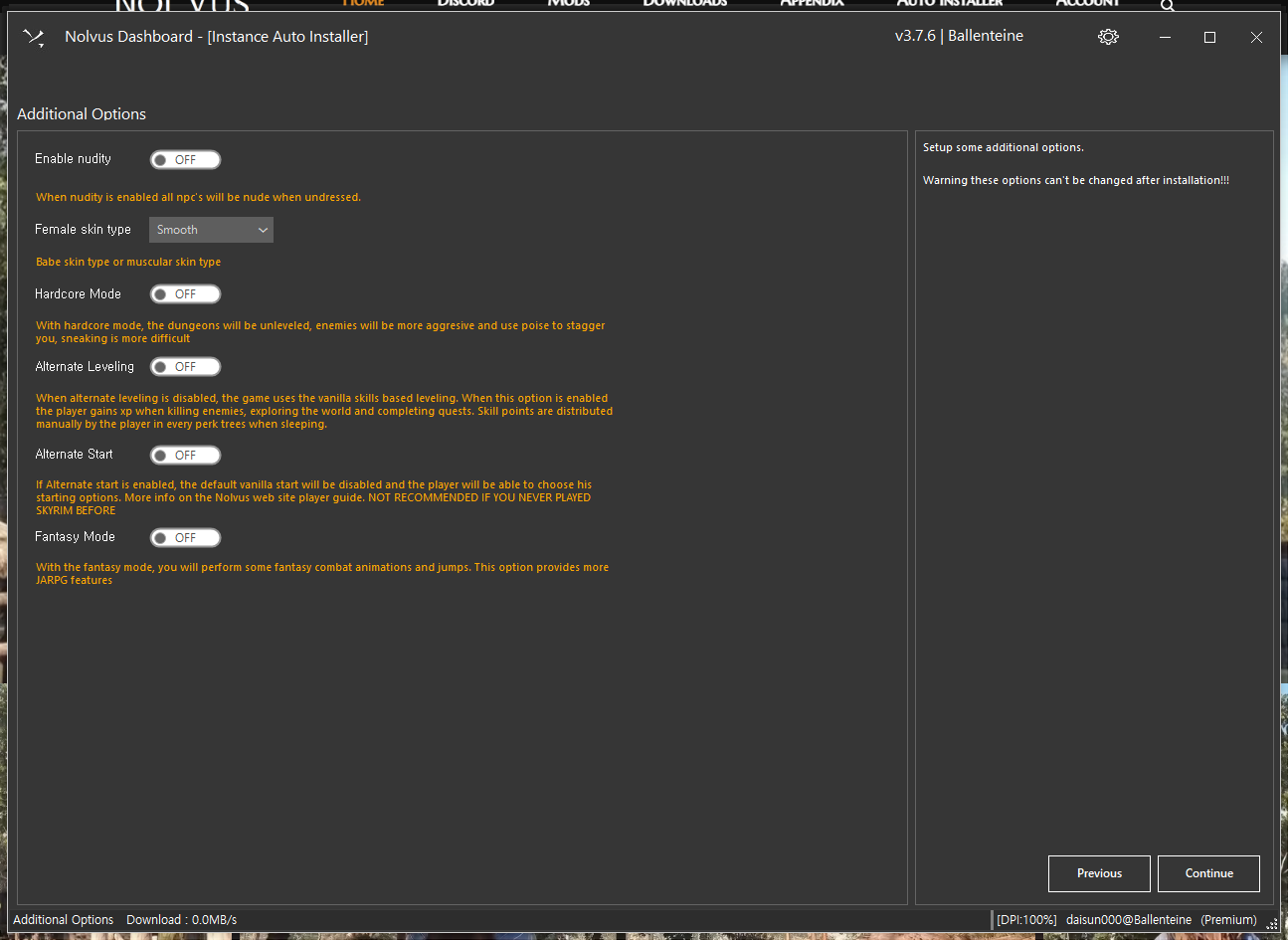
본인이 원하는 성향에 맞추어 설치 바랍니다.
ENB 설정
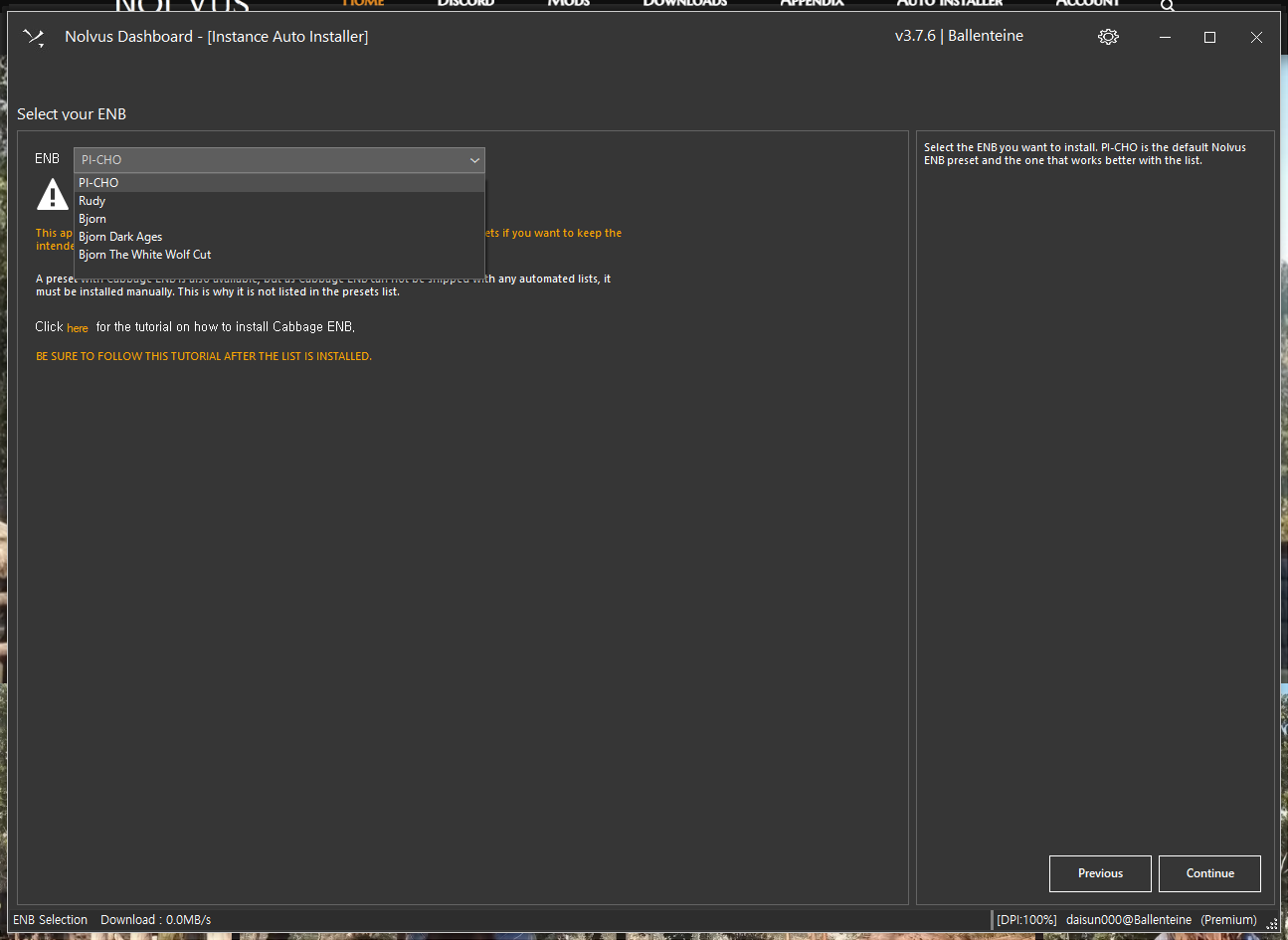
원하는 ENB를 비교 하여 설치 하시면 됩니다.
페이지 파일 설정
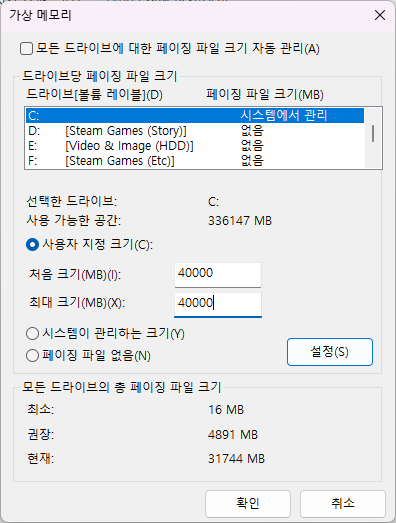
램이 16GB 일 경우 반드시 설정 하셔야 합니다.
가상 램 할당 방법
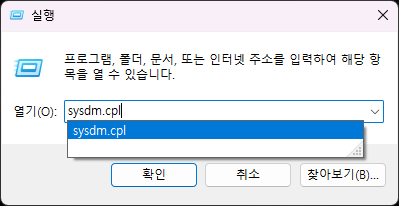
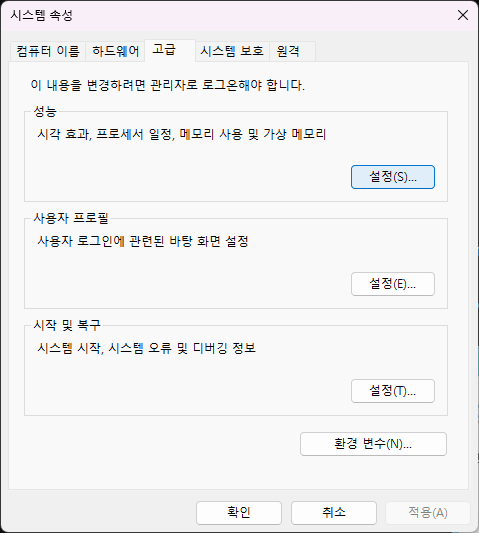
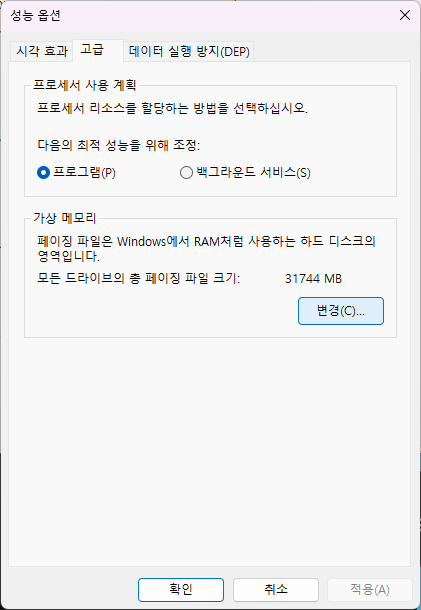
설치 위치 설정 (프리미엄 사용자만 포함)

다운 받을 서버 선택
→ 별 다른 이유가 없다면, 기본 Nexus CDN 으로 진행.
오류 보는 방식 선택
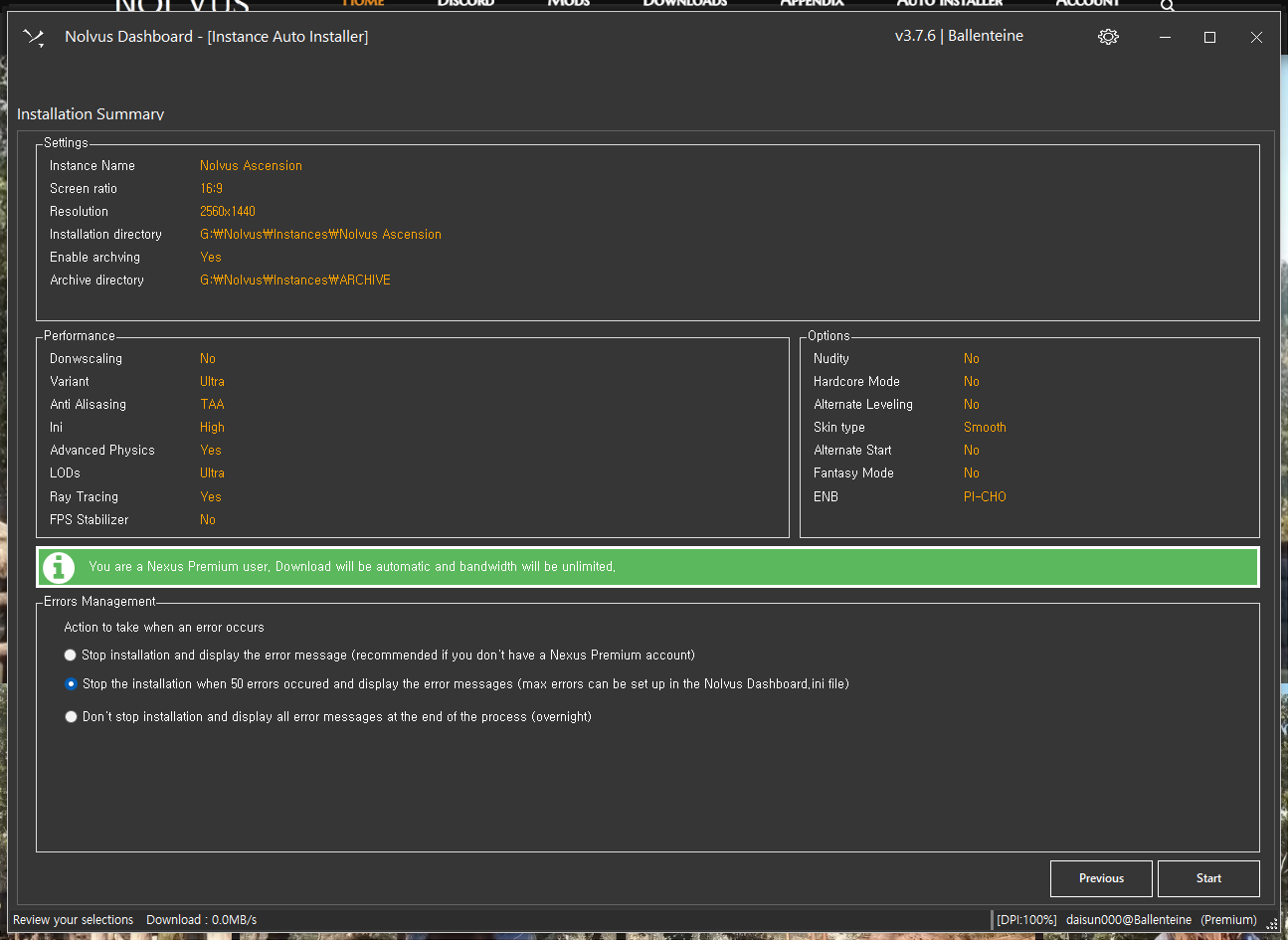
→ 두번쨰 것 선택 (넥서스 프리미엄 이용자)
만약, 넥서스 프리미엄 이용자가 아니라면, 첫번째 것을 사용
다운로드 완료
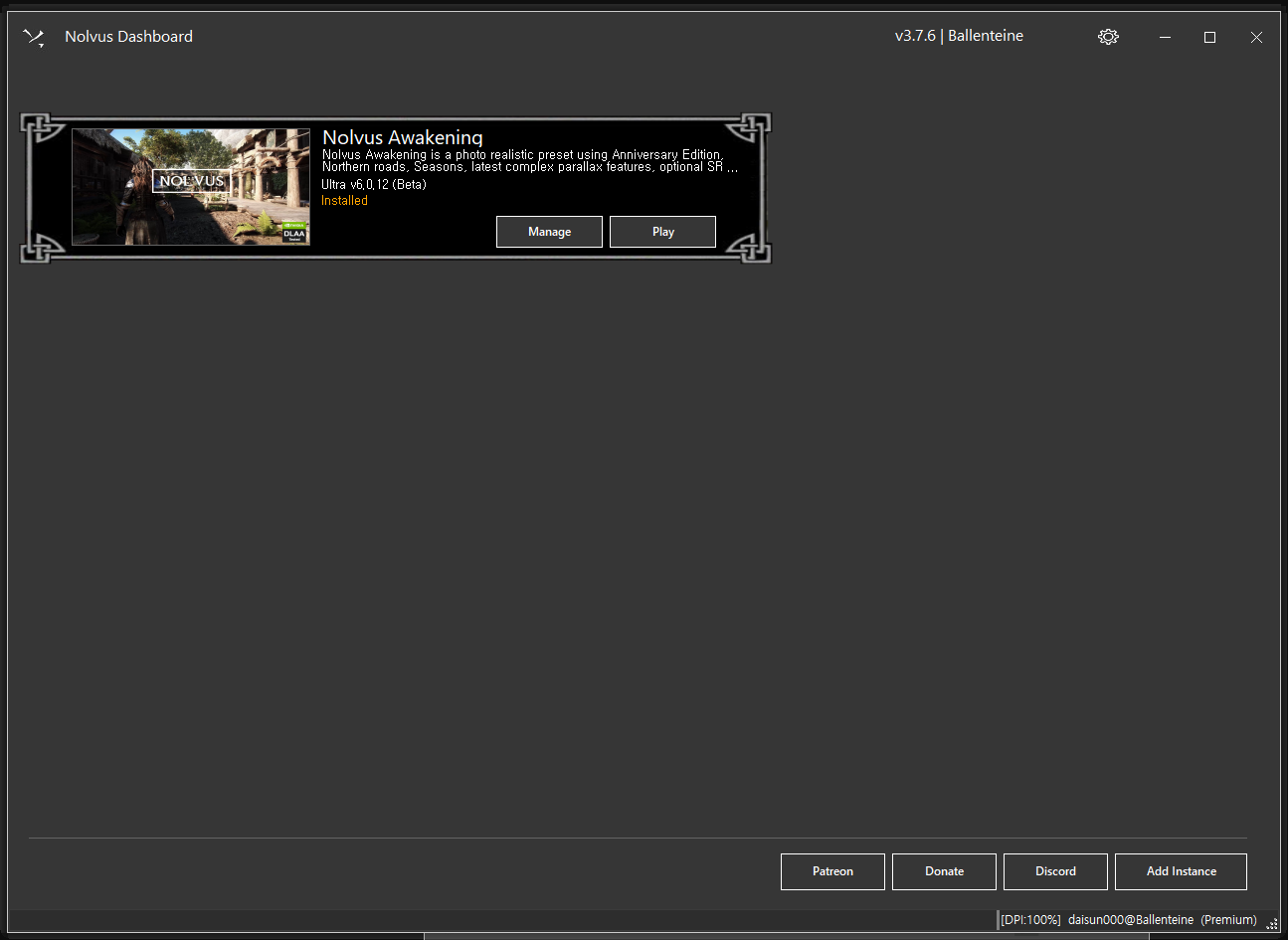
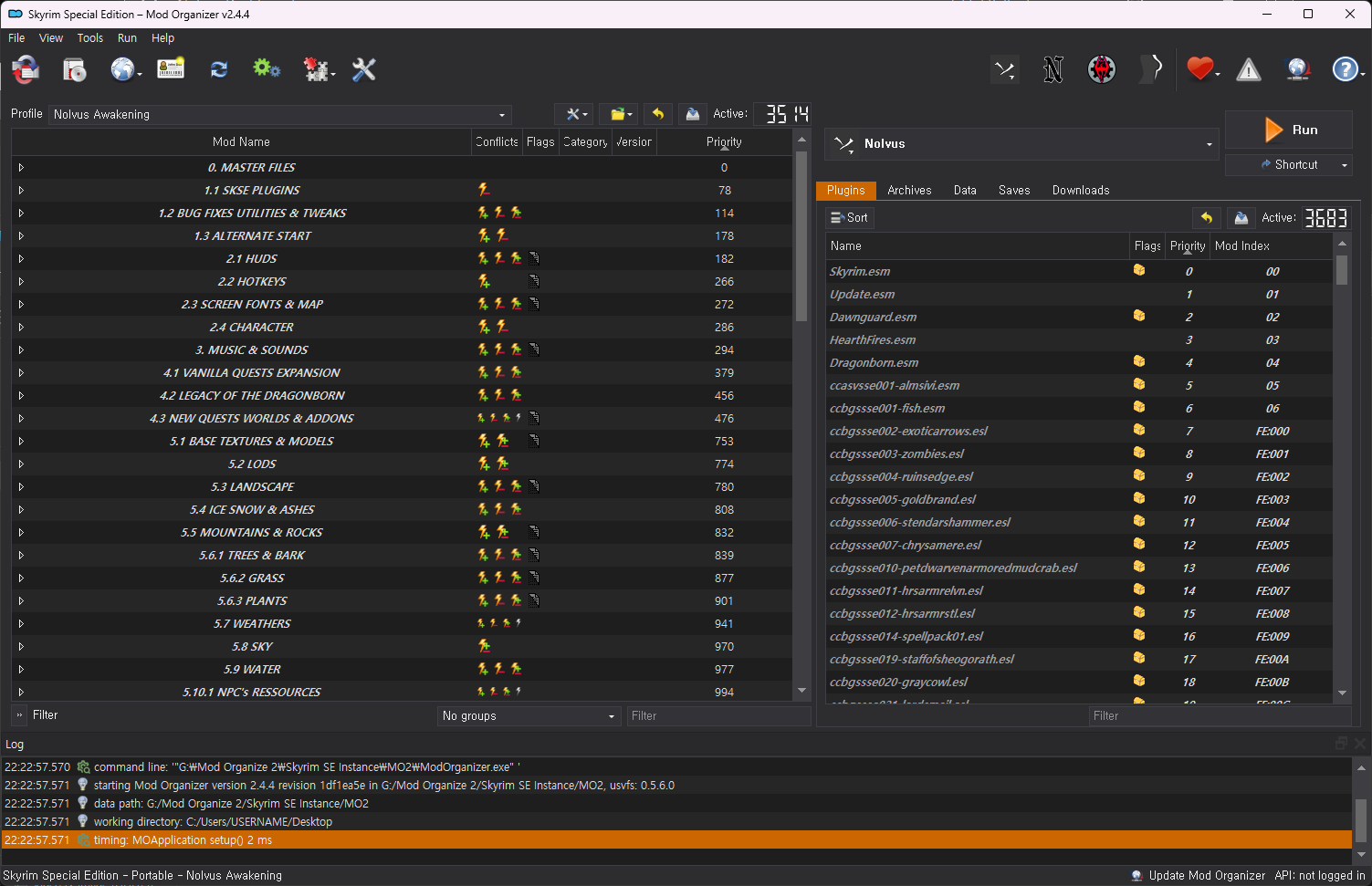
여기서 MO2로 진입 할 수 있고, 혹은 바로 플레이 또한 가능
설치 완료
업데이트 방법
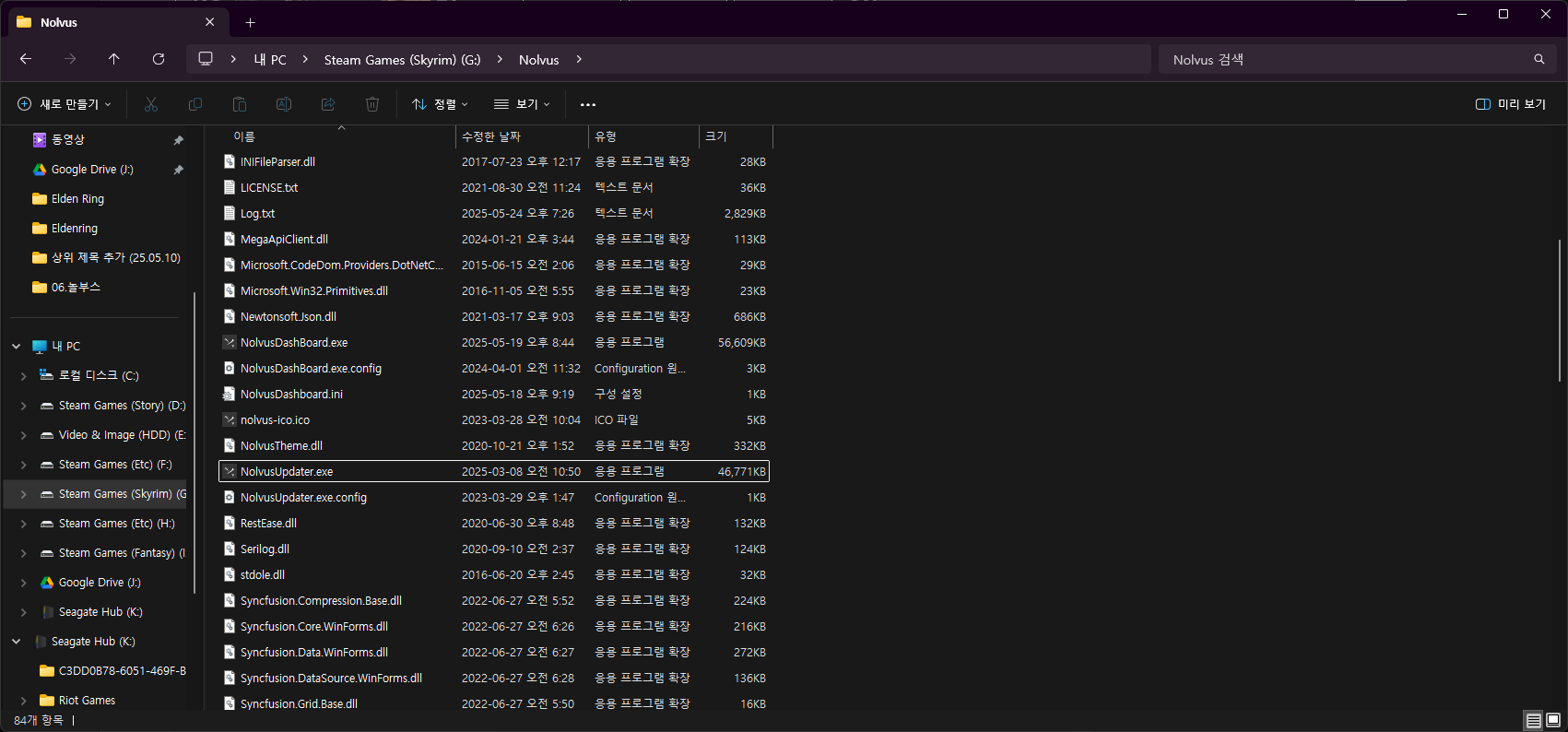
일반적으로 놀부스 업데이트가 진행되어야 수정 사항이 반영 됩니다.
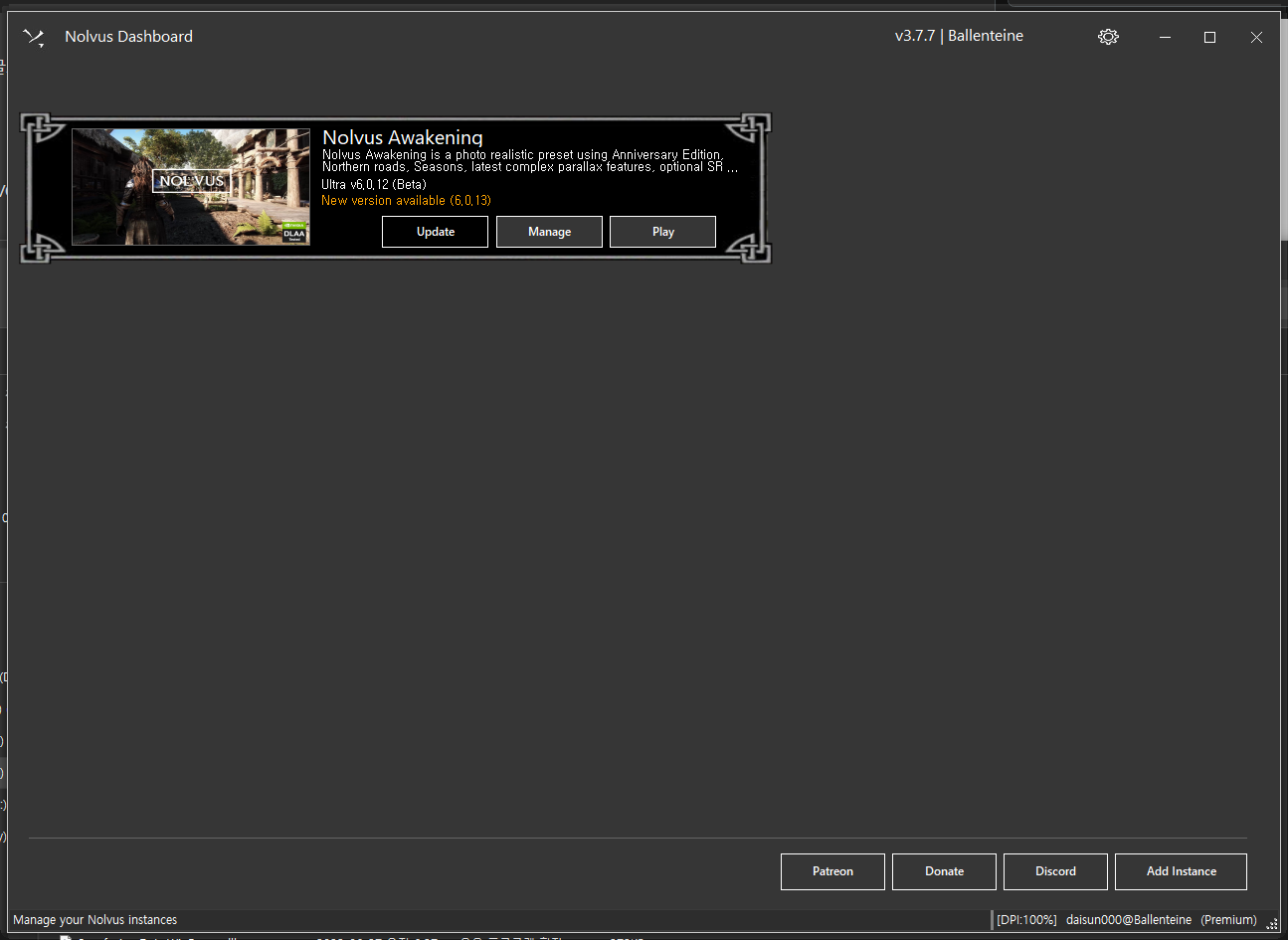
이후 실행 시, Update 버튼이 활성되어 있는데, 이 것만 확인 해 주시면 바로 실행 가능합니다.
한글 패치 방법
https://arca.live/b/tullius/135636507
한글 패치 파일은 위의 것을 사용하면 됩니다. (출처 - 아카라이브)
아래는 한글화 작성자님 설명
번역 설명
.esp 번역을 한 것이 아니라 sse-at 툴을 이용해 번역이 적용되어 있습니다. 따라서 기존 .esp가 변경될 염려는 없으나 해당 툴의 한계로 퀘스트 목록은 한글로 패치 되어 있지 않습니다.
한글화 적용 방법
1. 아래 모드 비활성화 (Mo2) 에서 진행
Gold To Septims - Weightless
YOT - Your Own Thoughts
2. 놀부스 한글화 파일 다운 받아서 Mo2에 설치 (파일은 위 링크에 기재 되어 있습니다.)
3. 이후 Mo2 에서 추가된 모드들을 활성화
→ 순서는 원본 모드보다 아래 위치하도록만 해주시면 됩니다만.. 통합 본이기 때문에 최하단에 한글 번역 파일들을 위치 시키는 것을 권장드립니다.
관련 글
'Steam > Elder Scrolls' 카테고리의 다른 글
| 스카이림 (Skyrim) :: Wabbajack 에서 모드팩 설치 방법 (영문) (0) | 2025.10.24 |
|---|
